

25 Aug SMS for Microsoft Teams: Text Customers from Teams with emu.chat
Your team already lives in Microsoft Teams. So why does texting a customer still mean picking up a personal mobile? Or digging through a shared inbox nobody quite trusts? Or asking “did anyone get back to them?” in the group chat?
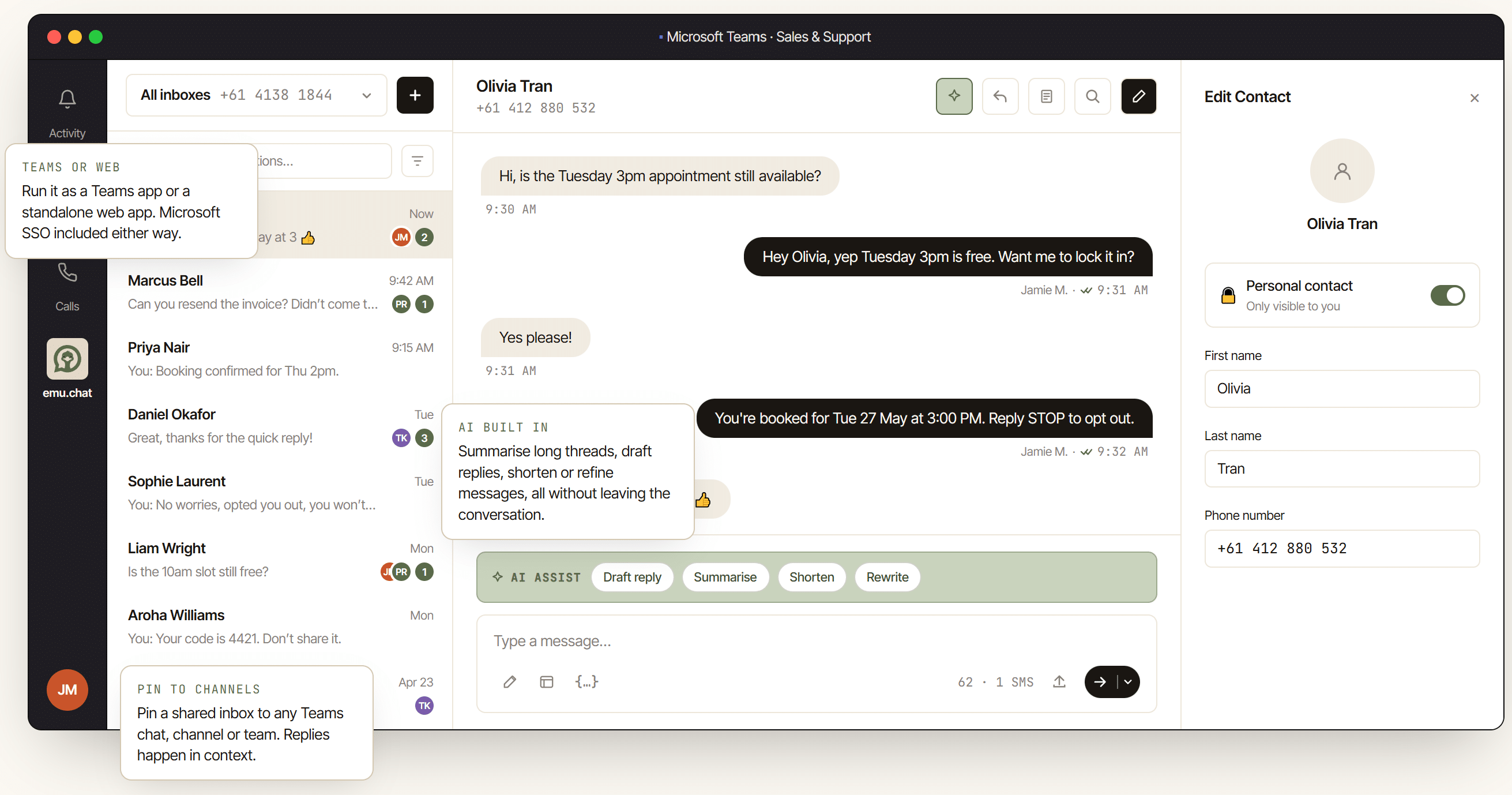
We built emu.chat to close that gap. It’s a new Microsoft Teams SMS integration from the team behind touchSMS, and it does one thing very well. It puts real, two-way SMS and MMS conversations inside the Teams channels, chats and teams your staff already use every day. So there’s no app-switching, no second inbox, and no texts trapped on one person’s phone.
Searching for an SMS solution for Microsoft Teams? Here’s what emu.chat does, the real problems it solves, and how it compares to a plain pay-as-you-go texting tool.
Why businesses search for “SMS for Microsoft Teams” in the first place
Most teams don’t go looking for a Teams SMS integration on a whim. Usually, one of these has just happened:
- A customer texted back and nobody saw it for two days. The reply landed on a mobile sitting in someone’s bag while they were on leave.
- A sales rep left the business. With them went the only phone number your customers had ever texted.
- A support query came in by SMS. Three different people replied without realising, and the customer got three slightly different answers.
- Finance asked, “can we see a record of every SMS we’ve sent, in case someone queries it?” The honest answer was no.
These aren’t edge cases. They’re what happens by default when SMS stays a personal, one-to-one channel instead of a shared business one. Microsoft Teams already solved this for email and chat: shared visibility, clean handoff and an audit trail. emu.chat brings the same model to SMS.
What emu.chat actually does inside Teams
emu.chat is a Microsoft Teams app that gives your business a shared SMS number. Your whole team can text from it and reply through it without leaving Teams. It also runs as a standalone web app on the same data, if your team prefers that.
Here’s what that looks like in practice.
Shared inboxes and clean handoff
- Shared inboxes that live in your channels. Pin an SMS inbox to any Teams chat, channel or team, so the conversation sits where the work already happens. A booking lands in your “Bookings” channel. An invoice query lands in “Accounts”. Everyone with access can see it, so nobody has to ask.
- Assign, hand off and reply as a team. When a customer texts back, someone claims the conversation and adds an internal note the customer never sees. If they go on leave or shift roles, they hand it off cleanly. So the full history stays with the conversation, not with one person’s phone.
AI, contact sync and single sign-on
- AI drafting and summarising in every thread. Long conversation to catch up on? Summarise it in one click. Need a reply? Draft one from the thread history, then shorten or rewrite it until it sounds right. In other words, it sits inside the conversation rather than in a separate tool you have to open.
- Your Microsoft 365 directory, in sync from day one. emu.chat pulls your staff list from Azure AD / Entra ID and your customer contacts from Outlook. As a result, names, mobiles and companies are already there before anyone starts typing. No manual contact list to maintain.
- Sign in with Microsoft SSO. Your team logs in with the Microsoft 365 account they already use. No new password, no separate login to remember, no extra account for IT to manage.
Compliance that comes as standard
emu.chat is an ACMA-certified Australian telco, so Spam Act and Opt Out handling ships with it from day one. The platform honours STOP and UNSUBSCRIBE automatically and keeps a full audit log per number and per message. So when finance or legal asks “can we prove this,” the answer is yes.
Real problems this solves (not just features)
Of course, anyone can list features. Here’s what they actually fix in the conversations SMS-enabled teams have every day.
Bookings: “Is the 10am slot still free?”
For example, a bookings or reception team gets this exact question dozens of times a week. With a shared inbox, whoever’s free answers it. The confirmation and the “reply STOP to opt out” line go out automatically. The next person to open that thread can see that someone already handled it. Nobody double-books, and nobody double-replies.
Accounts: “Can you resend the invoice?”
Similarly, an accounts team fields this constantly. The request no longer lands on one bookkeeper’s personal mobile, where it disappears if they’re out sick. It lands in the Accounts channel instead. Someone picks it up and closes it out with a note, so the next person who checks in on that customer has the full context.
Reminders and verification codes
For appointment reminders or two-factor codes, a templated SMS goes out in two keystrokes. emu.chat personalises it with the customer’s name and details straight from Outlook, then logs it for compliance. Nobody copies and pastes a phone number by hand.
When a rep leaves the business
In a lot of shops, the customer’s texting history walks out the door with them. A shared number and a shared inbox keep that history with the business. The next person picks it up mid-thread, not from scratch.
And “did anyone get back to them?” stops being a question anyone has to ask. The thread already shows the answer: assigned, replied, archived.
emu.chat vs. touchSMS for Teams: which one do you need?
touchSMS also offers a lighter, pay-as-you-go option inside Teams called touchSMS for Teams. It’s worth knowing the difference, so you land on the right one.
touchSMS for Teams enables SMS from a single user account. That suits alerts, reminders, 2FA codes, or a solo user who only needs to fire off the occasional text. Everyone configures the app with the same set of credentials, so you can’t tell who sent what. There’s no conversation assignment, no AI and no directory sync – just simple send-and-receive with pre-paid credits.
emu.chat covers the moment more than one person needs to see a reply. Do you run a sales desk, a support queue, a bookings line, dispatch or an accounts team? Then a customer’s message has to reach the right person even when someone’s away. As a rule of thumb: if “who’s covering this if Sam’s on leave” ever comes up, you want emu.chat rather than the pay-as-you-go option.
Started on touchSMS for Teams and outgrown it? Move across to emu.chat whenever you like, and keep your existing number.
Australian-built, which matters more than it sounds
We design and support emu.chat in Australia. It isn’t bolted on as an afterthought for a different platform. That means an ACMA-certified telco licence and direct connections to local carriers. Your customer data sits in AWS Sydney and never leaves the country. On top of that, support comes from a real Sydney-based team on a real phone number. Comparing Teams SMS tools? Ask every vendor where your customers’ data actually lives. For emu.chat, the answer is Australia, full stop.
Getting started
emu.chat starts at $10 AUD per user per month (ex GST, minimum three users). That covers 100 pooled SMS per user, a shared virtual number for every three seats, the full Teams and web app, all AI features, and Microsoft SSO. The 14-day free trial gives you 25 SMS credits and a test number, and you don’t need a credit card to start.
Is your team already fielding customer texts on personal phones? Tired of asking “did anyone get back to them”? Give it ten minutes and see it running in your own Teams tenant.
Start your 14-day free trial →
Or see the full feature and pricing breakdown →
Frequently asked questions
Do I need a Microsoft Teams licence to use emu.chat?
No. emu.chat runs as both a Teams app and a standalone web app, so pick whichever suits your team. Microsoft SSO comes with both, so people sign in with their existing Microsoft 365 account.
Can we keep our current business number?
Yes, as long as it’s an Australian mobile. touchSMS ports 04xx numbers across in 5 to 15 business days. Landlines and 13, 1300 and 1800 numbers won’t work.
What about the Spam Act and unsubscribes?
emu.chat handles both automatically. A registered, ACMA-certified Australian telco runs the platform. It checks every message against your Opt Out list, honours STOP and UNSUBSCRIBE automatically, and keeps a full audit log per number and per send.
Is emu.chat just for sales teams?
No. In fact, support, bookings, dispatch and accounts teams use it just as often. Most businesses run separate inboxes for different teams, each with its own number and its own routing.
Where is our data stored?
In Australia. Your customer data sits in AWS Sydney (ap-southeast-2) and never leaves the country, with direct local carrier connections for Australian sends.